Transformer Pad TF303CL is a 10.1″ tablet with GSM support. It has a very nice design and sports a beautiful IPS LCD display with a resolution of 1920 x 1200 pixels and 224 ppi pixel density. The display is not only sharp and crisp, but also has great viewing angles. It allows you to view various contents comfortably. Its capacitive touchscreen is very sensitive and enables smooth navigation. It also supports multitouch up to 10 fingers. The onscreen keyboard has good accuracy and quite spacious, but if you’re physical keyboard fans you must love the additional mobile dock. The dock is equipped with standard QWERTY keyboard and trackpad.
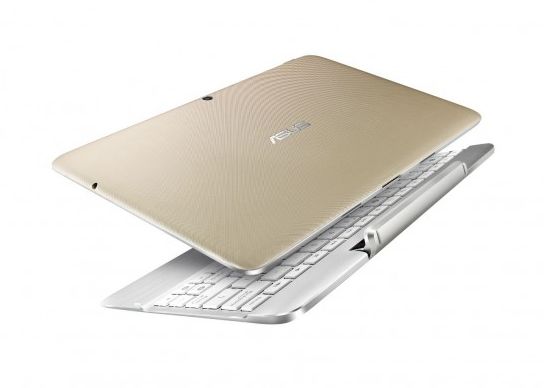 Asus Transformer Pad TF303CL is an Android v4.4.2 (KitKat) tablet. It uses Intel Atom Z3745 chipset with quad-core 1.86 GHz processor. It also incorporates Intel Gen 7 (Ivy Bridge) GPU and 2 GB of RAM. You can expect something great from its performance. It has the capability to do multitasking easily and supports 4G LTE too. The storage department is quite satisfying. It has 16/32 GB built-in memory (optional) and memory card slot for storage expansion.
The Transformer Pad TF303CL has two cameras. The main 5 MP camera is embedded on the back of the tablet. It features Geo-tagging and video recording capability. Above the display, you can find the secondary 1.2 MP camera which supports video calling.
Other features in Asus Transformer Pad TF303CL:
– Connectivity options: Wi-Fi 802.11 a/b/g/n (dual-band), hotspot; Bluetooth v4.0; and microUSB v2.0.
– Loudspeaker with stereo speakers
– GPS with A-GPS & GLONASS
– Compass, Email, Push Mail, Instant Messaging, HTML5 – MP3/WAV/WMA/AAC player and MP4/H.264 player
– Document viewer
– Photo viewer/editor
– Voice memo/dial
Size: 257.4 x 178.4 x 9.9 mm (10.13 x 7.02 x 0.39 in)
Weight: 595 g (1.31 lb)
Transformer Pad TF303CL Hard Reset to Restore Default Settings
- Go to Menu > tap Settings.
- Choose Backup and reset.
- Tap Factory data reset > Erase all data on tablet.
Download Asus Transformer Pad TF303CL User Manual PDF