Samsung Galaxy E7 is a new Android v4.4.4 (KitKat) smartphone from Samsung released last January. It’s available in two version: single SIM and dual SIM. The E7 has great specifications. It uses Qualcomm MSM8916 Snapdragon 410 chipset with quad-core 1.2 GHz Cortex-A53 CPU. It’s also backed by Adreno 306 GPU and 2 GB of RAM. Multitasking shouldn’t be a problem for this phone. The 4G LTE connectivity makes it even better to help you boost productivity. Storage department is very satisfying. It provides 16 GB built-in memory along with memory card slot that can accommodate up to 64 GB.
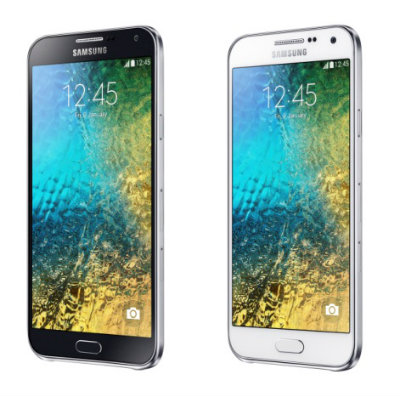 Samsung Galaxy E7 looks very slim and beautiful. It comes with unibody design and a huge 5.5″ Super AMOLED display which has 720 x 1280 pixels resolution and 267 ppi pixel density. It has the capability to deliver great viewing experience. Operating the phone is much easier with the support of its multitouch capacitive touchscreen. It’s responsive and fun to use. The virtual keyboard is perfect for typing. It has good accuracy and spacious enough so you can type comfortably.
The camera department is definitely one the best parts of Samsung Galaxy E7. You can find a front-facing 5 MP camera above the display that can be used for video calling. Selfie fans will love it too. The main 13 MP camera is embedded on the back panel. It has the capability to take good quality pictures and videos. The camera features autofocus, LED flash, Geo-tagging, touch focus, face detection, panorama and video recording capability (1080p@30fps).
Other features in Samsung Galaxy E7:
– Accelerometer and Proximity sensor.
– Connectivity options: Wi-Fi; Bluetooth v4.0, A2DP; and microUSB v2.0.
– GPS with A-GPS & GLONASS
– Email, Push Mail, Instant Messaging, HTML5 browser
– MP4/WMV/H.264 player and MP3/WAV/WMA/eAAC+/FLAC player
– Photo editor
– Video editor
– Document viewer
Size: 151.3 x 77.2 x 7.3 mm (5.96 x 3.04 x 0.29 in)
How to Perform Samsung Galaxy E7 Factory Reset
Before performing factory reset, it is better to back up your important files.
- Go to Settings.
- Select Backup and reset listed under User and Backup.
- Tap Factory data reset.
- Tap Reset device.
Download Samsung Galaxy E7 User Manual PDF
I want galaxy E7 operational mannual in book for. Not able to down load pl send in mail. 09444947927
This site is totally useless. User Manual will not download. Why is Samsung getting involved with them?
I want galaxy E7 operational mannual in PDF form as I am not able to download and save it in my mobile or PC.