Sony Xperia C3 is an Android v4.4.2 (KitKat) smartphone with lots of interesting things to offer. It looks slim and elegant with metallic touch on both sides of the phone. The 5.5″ IPS LCD display has a resolution of 720 x 1280 pixels and 267 ppi pixel density. To give you a great visual experience, it also incorporates Sony Mobile BRAVIA Engine 2 and Triluminos display technology. The screen is even better with wider viewing angles and good visibility. The touchscreen is responsive and fun to use. It supports Multitouch (up to 10 fingers). Typing on its virtual keyboard shouldn’t be a problem since it’s very spacious and has good accuracy.
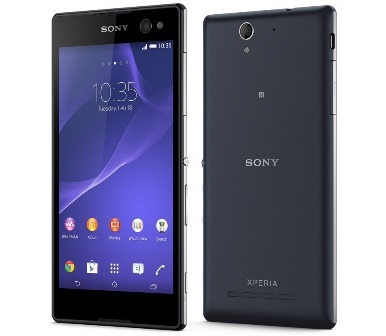 Sony Xperia C3 packs Qualcomm MSM8926 Snapdragon 400 chipset with a quad-core 1.2 GHz Cortex-A7 processor, Adreno 305 GPU and 1 GB of RAM. It might not be a “beast” in terms of speed but it provides enough power to tackle various tasks. Editing documents, playing games, and browsing the internet, all can be done in decent speed. The Xperia C3 is also integrated with 4G LTE connectivity which can help you boost your productivity. To support the performance, it relies on a non-removable Li-Ion 2500 mAh battery. For the storage, it provides 8 GB built-in memory and memory card slot that can accomodate microSD card up to 32 GB.
The main 8 MP camera can be found on the rear panel. It is equipped with autofocus, LED flash, Geo-tagging, touch focus, face and smile detection, panorama, HDR, and video recording capability. The Xperia C3 is a perfect device for selfie lovers as it has an amazing 5 MP front-facing camera.
Other features in Sony Xperia C3:
– Accelerometer and Proximity sensor
– Connectivity options: Wi-Fi 802.11 b/g/n, Wi-Fi Direct, Wi-Fi hotspot; DLNA; Bluetooth v4.0, A2DP; NFC; and microUSB v2.0.
– Compass, Email, Instant Messaging, Push Email, HTML5 browser
– FM radio with RDS, GPS with A-GPS & GLONASS
– Active noise cancellation with dedicated mic
– ANT+ support, SNS integration
– Xvid/MP4/H.263/H.264 player and MP3/eAAC+/WAV/WMA/Flac player
– Document viewer
– Photo viewer/editor
Size: 156.2 x 78.7 x 7.6 mm (6.15 x 3.10 x 0.30 in)
Weight: 149.7 g (5.29 oz)
How to hard reset Sony Xperia C3
To avoid permanent damage to your device, do not restart your device while a reset procedure is underway. Before you start, make sure to back up any important data that is saved on the internal memory of your device to a memory card or other non-internal memory.
- From your Home screen, go to Menu.
- Tap Settings > Backup & reset > Factory data reset.
- To delete information, such as pictures and music, from your internal storage, mark the Erase internal storage
- Tap Reset phone.
- If required, draw your screen unlock pattern, or enter your screen unlock password or PIN to continue.
- To confirm, tap Erase everything.
Download Sony Xperia C3 User Manual PDF