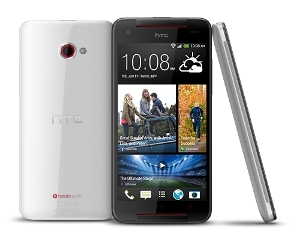
 HTC Butterfly S offers an unforgettable visual experience with its beautiful 5.0″ Super LCD3 display. The high resolution of 1080 x 1920 pixels (441 ppi pixel density) makes everything looks amazing on the screen. You can enjoy high quality images including HD movies and high-graphic games in this phone. It’s even better with excellent visibility and viewing angles. The touchscreen is quite responsive and support multitouch. To prevent scratches, it is protected by Corning Gorilla Glass 3. Other supporting features are HTC Sense UI v5, Accelerometer, Gyroscope and Proximity sensor.
The Butterfly S uses Android v4.2.2 (Jelly Bean) for its operating system. Under the hood, a quad-core 1.9 GHz Krait 300 processor is paired with Adreno 320 GPU and 2 GB of RAM. It shows impressive performance. Apps can load fast and you’ll see smooth transition between menus. Multitasking shouldn’t be a problem at all when you use such a powerful phone. 4G LTE support is a perfect addition since you can enjoy faster data connection. The storage sector is pretty satisfactory. 16 GB built-in memory will accommodate your videos, photos, and music. You can even add extra space by using external memory card (up to 64 GB).
A 4 MP camera (f/2.0 module) is embedded on the back of the phone. It features focus, LED flash, 1/3” sensor size, 2µm pixel size, simultaneous HD video and image recording, geo-tagging, face and smile detection, and HDR. The HTC Butterfly S also includes a front-facing 2.1 MP camera that supports video calling.
Connectivity options: Wi-Fi 802.11 a/b/g/n/ac (dual-band), Wi-Fi Direct, Wi-Fi hotspot; DLNA; Bluetooth v4.0 with A2DP; NFC; Infrared port; and microUSB v2.0 (MHL).
Dropbox (25 GB cloud storage), Digital compass, Email, Push Email, HTML5, Stereo FM radio with RDS, GPS with A-GPS support and GLONASS, , Photo viewer and editor, SNS integration, TV-out (via MHL A/V link), Active noise cancellation with dedicated mic, stereo speakers, built-in amplifiers, DivX/XviD/MP4/H.263/H.264/WMV player, MP3/eAAC+/WMA/WAV/FLAC player, Google Search, Maps, Gmail, YouTube, Calendar, Google Talk, Organizer, Document viewer and editor, Voice memo, Voice dial, Voice commands, Predictive text input and more.
Size: 144.5 x 70.5 x 10.6 mm (5.69 x 2.78 x 0.42 in)
Weight: 160 g (5.64 oz)
Performing a factory reset from settings
- Go to Settings, and then tap Backup & reset.
- Tap Reset phone.
- If you also want to delete media and other data on HTC Butterfly s, select Erase all data.
- Tap OK.
Performing a factory reset using hardware buttons
- If you can’t turn HTC Butterfly S on or access settings, you can still perform a factory reset by using the hardware buttons on HTC Butterfly S.
- Press and hold the VOLUME DOWN button, and then press and hold the POWER button.
- Wait for the screen with the three Android images to appear, and then release the POWER and VOLUME DOWN buttons.
- Press VOLUME DOWN to select FACTORY RESET, and then press the POWER button
Download HTC Butterfly S User Manual