Lenovo Vibe X2 is a very good looking smartphone with a sleek and slim design. It feels solid and has a premium taste. It also promotes three-layer design which combines tasteful colors. The only problem could be its large size that makes it less practical. It may not fit in your pocket and you’ll need two hands to use it. The 5.0” IPS LCD display is very eye-catching. It has a high resolution of 1080 x 1920 pixels and 441 ppi pixel density. It dominates the front panel with 71.7% screen-to-body ratio. This is a perfect device to boost your multimedia experience. The capacitive touchscreen supports multitouch (up to 5 fingers) and is quite sensitive. Typing is no more a problem for large fingers since it has spacious virtual keyboard.
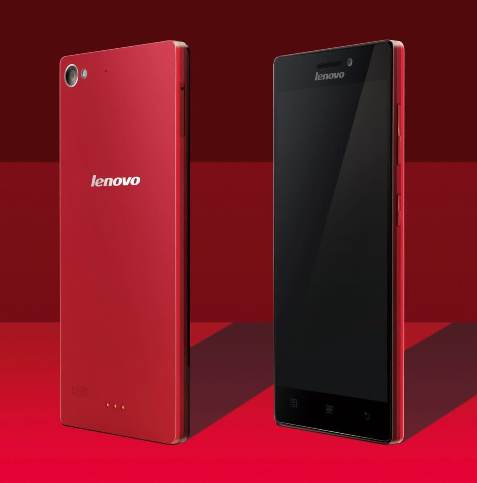 Lenovo Vibe X2 uses MediaTek MT6595m True8Core chipset with quad-core 2.0 GHz Cortex-A17 CPU and quad-core 1.7 GHz Cortex-A7 CPU. It is also backed by PowerVR G600 GPU and 2 GB of RAM. From the specs we know that this phone has the capability to execute every task flawlessly. Android OS v4.4 (KitKat) runs smoothly as well as many other apps. With high-speed 4G LTE support, the Vibe X2 enables faster data connectivity and helps you boost productivity. The storage department is quite satisfying. It offers 32 GB built-in memory to accommodate your files. The absence of memory card slot doesn’t seem to be a big deal. Another advantage from Lenovo Vibe X2 is you can use two different SIM cards simultaneously. It is considered more efficient when you want to separate business and pleasure.
The 13 MP rear camera is quite reliable to take good quality photos and videos. It features autofocus, LED flash, Geo-tagging, touch focus, face detection, panorama, HDR and video recording capability (1080p@30fps). The Vibe X2 also includes a front-facing 5 MP camera that will please selfie lovers.
Other features in Lenovo Vibe X2:
- GPS with A-GPS & GLONASS
- FM radio
- Accelerometer, proximity, compass
- Email, Push Mail, Instant Messaging, HTML5 browser
- Air gestures
- Active noise cancellation with dedicated mic
- MP4/H.264 player and MP3/WAV/WMA/eAAC+ player
- Photo/video editor
- Document viewer
- Voice memo/dial
Size: 140.2 x 68.6 x 7.3 mm (5.52 x 2.70 x 0.29 in)
Weight: 120 g (4.23 oz)
How to reset Lenovo Vibe X2 (hard reset)
The process will erase all data. Make sure to back up your important data before performing hard reset.
- Make sure the phone has enough power to perform hard reset. It’s better if the phone is fully charged.
- Go to Menu Setting > Storage > Factory Data Reset.
- Select Reset Phone > Erase Everything.
- Wait until it finish.
Download Lenovo Vibe X2 User Manual PDF