LG L80 is an Android v4.4.2 (KitKat) smartphone with dual SIM card capability. Packing a dual-core 1.2 GHz Cortex-A7 processor with Adreno 302 GPU and 1 GB of RAM, the L80’s performance is very satisfactory. It works in decent speed and is pretty reliable to do various tasks. It has sufficient power to do multitasking and many other things. Too bad you will not have much space to store your files since the phone only provides 4 GB of internal storage. You should expand it yourself by adding microSD card (up to 32 GB).
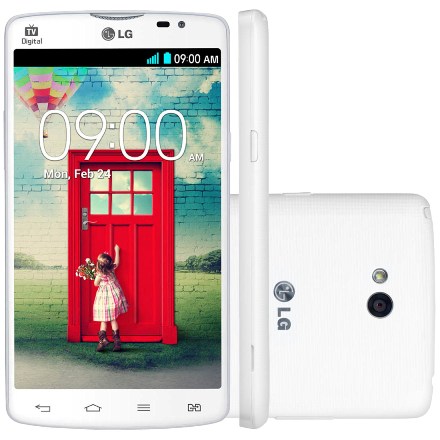 LG L80 has a good looking. You can see the slim bezels around its 5.0″ IPS LCD display and that make it looks wider. With that size of display, there is expectation that the resolution can go higher than 480 x 800 pixels, but that’s all we can get. Some areas must be compromised to make an affordable smartphone. Well, at least the large screen gives more comfort in viewing contents despite the lack of crispness of the images. The responsive capacitive touchscreen allows you to type and navigate comfortably. The onscreen keyboard is also spacious enough for large fingers.
Above the display, you can see the secondary VGA camera. It might not be too good for selfies. The main 5 MP camera is embbedded on the rear panel. It is equipped with some features like autofocus, LED flash, Geo-tagging, touch focus, face detection, panoramaan and video recording capability.
Other features in LG L80:
- Connectivity options: Wi-Fi 802.11 b/g/n, Wi-Fi Direct, Wi-Fi hotspot; Bluetooth v4.0, A2DP; and microUSB v2.0.
- Accelerometer and Proximity sensor.
- Email, Push Mail, Instant Messaging, Internet browser
- FM radio
- GPS with A-GPS, GLONASS
- MP4/H.264/H.263 player and MP3/WAV/eAAC+/FLAC player
- Photo viewer/editor
- Document viewer
- Voice memo/dial
- Predictive text input
Size: 5.44 x 2.93 x 0.38 inches (138.2 x 74.3 x 9.7 mm)
How to perform LG L80 factory reset
- Back up your important data since factory reset will erase all data and applications.
- Go to Menu > Setting
- Choose Backup and Reset > Factory Data Reset
- Tap Reset Device > Delete all