If you want a smartphone with superb performance and cutting-edge design, you should consider Samsung Galaxy Note Edge. It has a very unique asymmetrical shape and curved edge screen that you might never seen before. Its 5.6″ Super AMOLED display will amaze you too since it has a very high resolution of 1600 x 2560 pixels (524 ppi pixel density). It is perfect for viewing high-graphics contents including HD movies. The multitouch touchscreen is quite responsive and equipped with S Pen stylus, so it can support your work well. For protection, the screen is covered by Corning Gorilla Glass 3. The Note Edge offers you both great viewing experience and a new sensation of using a smartphone.
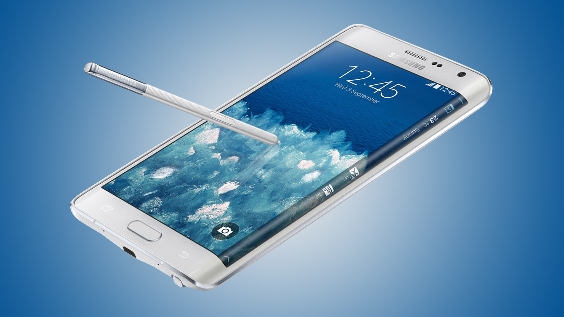
Samsung Galaxy Note Edge is a monster phone in terms of specs. It carries Snapdragon 805 chipset with quad-core 2.7 GHz Krait 450 processor. To deliver a mind-blowing performance, they are accompanied by Adreno 420 GPU and 3 GB of RAM. It runs Android OS v4.4.4 (KitKat) effortlessly. You can save more of your time when working because the processing speed is amazing. You don’t have to wait the apps loading too long and you can switch menus smoothly. The presence of 4G LTE support is also vital to boost your productivity. The Galaxy Note Edge offers 32/64 GB of internal storage (optional). Storage expansion is allowed via microSD card (up to 128 GB).
Samsung Galaxy Note Edge also spoils photography lovers with its 16 MP camera. You can find the camera on the rear panel. It has rich features like optical image stabilization, autofocus, LED flash, Dual Shot, Simultaneous HD video and image recording, geo-tagging, touch focus, face/smile detection, panorama and HDR. If you like to take selfies, you must love its front-facing 3.7 MP camera.
Other features in Samsung Galaxy Note Edge:
- Connectivity options: Wi-Fi 802.11 a/b/g/n/ac (dual-band), Wi-Fi Direct, Wi-Fi hotspot; DLNA; Bluetooth v4.1, A2DP, EDR, LE; microUSB v2.0 (MHL 3), USB Host; NFC; and Infrared port.
- Accelerometer, Gyroscope and Proximity sensor
- Fingerprint sensor, Compass, Barometer, UV sensor, Heart rate sensor, SpO2, Air gestures.
- Email, Push Mail, Instant Messaging, HTML5 browser
- GPS with A-GPS, GLONASS, Beidou.
- Fast battery charging: 60% in 30 min (Quick Charge 2.0)
- ANT+ support
- S-Voice natural language commands and dictation
- Dropbox (50 GB cloud storage)
- Active noise cancellation with dedicated mic
- TV-out (via MHL 3 A/V link)
- MP4/DivX/XviD/WMV/H.264 player and MP3/WAV/eAAC+/AC3/FLAC player
- Photo/video editor
- Document viewer(Word, Excel, PowerPoint, PDF)
- Voice memo/dial/commands
Size: 151.3 x 82.4 x 8.3 mm (5.96 x 3.24 x 0.33 in)
Weight: 174 g (6.14 oz)
How to hard reset Samsung Galaxy Note Edge
When you perform a Factory data reset, all your personal information is erased from the phone, and all settings are returned to the factory defaults. All data will be erased, and cannot be recovered. A factory data reset also erases the key for decrypting files stored on an optional installed memory card, so files on the card cannot be used after the reset.
- From a Home screen, tap Apps > Settings.
- Tap Backup and Reset > Factory data reset > Reset device. If you have set a PIN, password, or fingerprint screen lock, enter the PIN or password (or backup password, in the case of fingerprint), and tap Continue.
- If you are certain you want to reset your phone and delete your personal information and downloaded applications, tap Delete all.
Download Samsung Galaxy Note Edge User Manual PDF