Acer Liquid Zest is an Android v6.0 (Marshmallow) smartphone powered by 1GHz quad-core processor and Mali-T720MP2 GPU. The specifications don’t seem quite attractive but it has many attractive features to offer. The Liquid Zest supports 4G LTE that enables faster data connection. It will be very helpful when you often work online or enjoy entertainment on the web. The DTS HD Premium Sound delivers high quality audio with clear vocals and natural details. If you love listening to music while you’re mobile, this kind of feature will fit you well. The Acer Liquid Zest also comes with pre-installed Acer GameZone. If you want a more practical device, the dual SIM version could be the best option. It gives you flexibility in managing your communication budget.
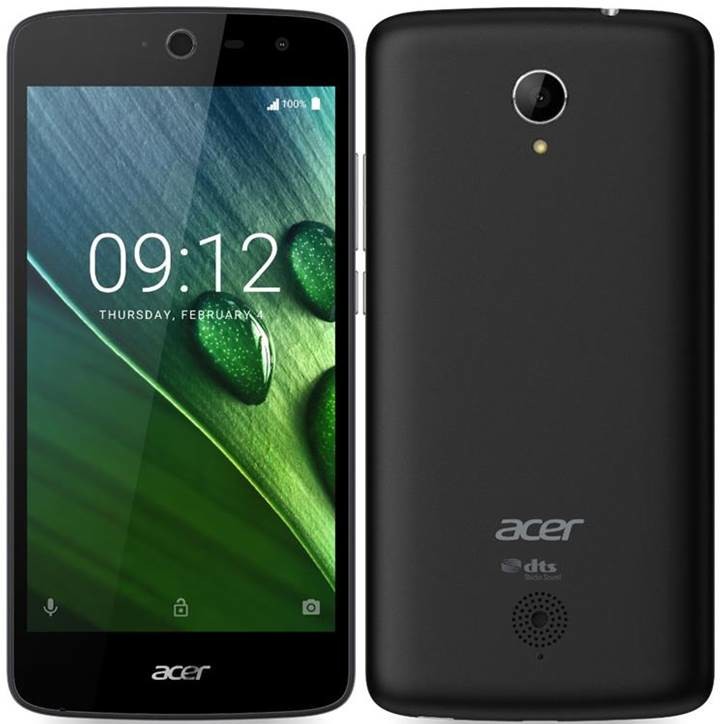 In terms of design, Acer Liquid Zest is a good looking smartphone. It has slim bezel and a large 5.0″ IPS LCD screen. This combination makes it looks sleek and attractive. It might be difficult to use this phone in one hand, but thankfully, the slightly curved edges will make sure you can hold it comfortably. The display has a high resolution of 720 x 1280 pixels and 294 ppi pixel density. It has the capacity to deliver high quality pictures. The wide viewing angles give you more comfort when watching videos or browsing browsing images on the web. The Acer BluelightShield reduces blue light emission to improve viewing comfort. You can also find other interesting features like Zero Air Gap technology and On-Cell Touch technology.
Above the screen, there is a secondary 5 MP camera with 85-degree wide-angle lens. It’s a great front-facing camera for both taking selfies or video calling. For the primary one, Acer Liquid Zest offers 8 MP camera on the back of its body. It features f/2.0, autofocus, LED flashlight, Geo-tagging, touch focus, face detection, HDR, panorama mode and HD video recording capability.
Other features available in Acer Liquid Zest 4G:
– Connectivity options: Wi-Fi; Bluetooth v4.0, A2DP; microUSB v2.0
– GPS with A-GPS
– Accelerometer, proximity sensor, compass
– Email, Push Mail, Instant Messaging, HTML5 browser
– MP3/WAV/AAC/Flac player and MP4/H.264 player
– Photo and video editor
– Document viewer
How to Factory Reset Acer Liquid Zest 4G
- When the phone is on, hold down the Power button for a short while.
- Go to Settings.
- Select General > Backup & Reset.
- Tap Factory Data Reset.
- Select Reset Phone > Erase Everything.
- Tap OK to confirm the hard reset.
Download Acer Liquid Zest 4G User Manual