Samsung Galaxy V Plus is a simple smartphone that packs key features to optimize your mobile life. It runs Android v4.4.2 (KitKat) operating system and armed with a dual-core 1.2 GHz processor and 512 MB of RAM. Despite the low specs, the device still has the capability to handle simple tasks. The processing could be an issue but that’s something you should compromise with. When the memory is full, you may find it work harder and slight delays could be a common thing. The good thing is you can find two SIM card slot in this phone. The Galaxy V Plus allows you to use two different providers at the same time. The storage is quite limited since it only has 4 GB built-in memory. You must add microSD card (support up to 64 GB) to give extra space for your files.
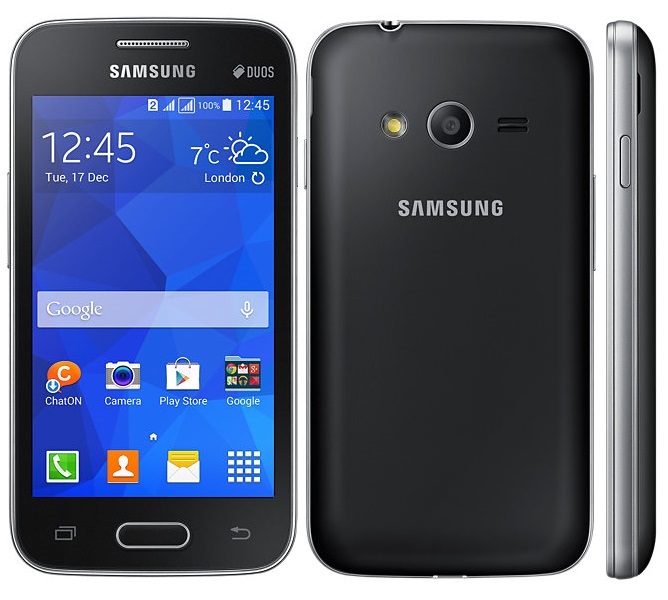 The Galaxy V Plus has an ergonomic design with its curved corners. It feels good to hold and very practical. The size is moderate as it only has 4.0″ TFT capacitive touchscreen. It will slip easily into your pocket and you can use it comfortably with one hand. The screen has a resolution of 480 x 800 pixels and 233 ppi pixel density. It offers decent quality visuals for everyday use. You can watch videos comfortably although you may find the lack of sharpness. Legibility is good as you can read the text clearly. The responsive touchscreen makes it easier to navigate through menus. It also supports multitouch.
This is a phone that offers usability, not fancy features. That’s why you can’t complain much when it has 3.15 MP camera as its primary camera. The LED flash is a good addition as it will help you take pictures in low light conditions. It is also equipped with Geo-tagging and video recording capability. A front-facing VGA camera doesn’t seem attractive for selfie fans. Nevertheless, it can be useful when you need to make video call.
Other features that you can find in Samsung Galaxy V Plus:
– Connectivity options: Wi-Fi 802.11 b/g/n, Wi-Fi Direct, hotspot; Bluetooth v4.0, A2DP; and microUSB v2.0
– GPS with A-GPS, GLONASS
– FM radio
– Accelerometer
– Email, Push Mail, Instant Messaging, HTML
– MP4/H.264 player and MP3/WAV/AAC/FLAC player
– Photo and Video editor
– Document viewer
Size: 121.4 x 62.9 x 10.7 mm (4.78 x 2.48 x 0.42 in)
Weight: 123 g (4.34 oz)
How to Hard Reset Samsung Galaxy V Plus
- From the main screen, go to Settings.
- Choose Backup and reset.
- Tap Factory data reset.
- Select Reset device option and then tap Erase everything.
*It’s important to back up your important files before performing hard reset since it will erase all data.