Nokia 225 is an affordable feature phone with attractive and colorful design. It is available in red, yellow, green, black, white. It comes with candy bar design featuring a 2.8-inch screen and a traditional keypad underneath. The keypad is dust-proof and splash-proof so it’s pretty special. The screen has a resolution of 240 x 320 pixels (143 ppi pixel density). It looks fairly bright and clear. On the rear panel you can find a 2 MP camera. This is the only camera available in this phone, there is no front-facing camera. It features 1/5” sensor size and video recording capability.
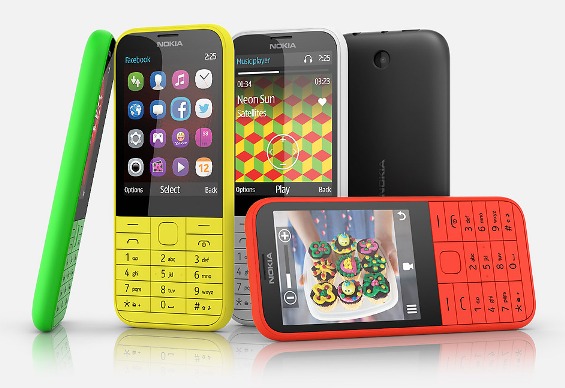 Nokia 225 is powered by Li-Ion 1200 mAh battery. The phone has two models: single-SIM and dual-SIM. The battery can last up to 36 days for the single-SIM model and 27 days for a dual-SIM model. To store your files, the 225 provides memory card slot that accommodates up to 32 GB. For the connectivity, it has Bluetooth v3.0; and microUSB v2.0.
Other features in Nokia 225:
– Stereo FM radio
– Email, Instant Messaging
– WAP 2.0/xHTML browser
– Facebook and Twitter apps
– Games: Block Breaker 3, Asphalt 6, Assassins Creed 3, The Avengers
– SNS applications
– MP4/H.263 player and MP3/WAV/AAC player
– Organizer
– Voice memo
– Predictive text input
Size: 124 x 55.5 x 10.4 mm (4.88 x 2.19 x 0.41 in)
Weight: 100.6 g (3.56 oz)
How to perform Nokia 225 factory reset
- Press Power button until the phone turns on.
- Tress and hold * key + 3 key + Call button + Power button.
- When the Nokia logo appears, release the buttons.
- Enter your lock code. The default lock code is 12345.
- The phone will reset and restart.
Download Nokia 225 User Manual PDF