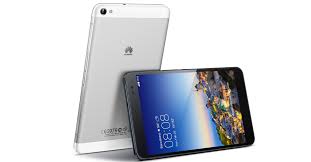
 Huawei MediaPad X1 comes with a sleek design and luxurious metallic body. Its 7.0″ IPS LCD display looks impressive with a high resolution of 1200 x 1920 pixels (323 ppi pixel density). It delivers good details and color accuracy. You can watch high quality videos and photos at its best. The screen has great viewing angles and visibility even when you use it outdoors. The touchscreen is quite responsive and supports multitouch (up to 10 fingers). It will help you navigate easily thorugh menus. Other features like Emotion UI 2.0, Accelerometer, Gyroscope, and Proximity senso are included.
Huawei MediaPad X1 is armed with a quad-core 1.6 GHz Cortex-A9 processor, Mali-450MP4 GPU and 2 GB of RAM. It works responsively and has enough power to execute various tasks, even the heavy ones. Android v4.2.2 (Jelly Bean) operating system runs flawlessly in this device. Apps load quickly, so you can save more of your time. The MediaPad X1 has SIM card slot, which means that you can make calls or send text messages. To store your files, it provides 16 GB of internal storage. If you need more, just add external memory card into the device.
Huawei MediaPad X1 is equipped with a brilliant 13 MP camera on the back of its body. It features autofocus, LED flash, Geo-tagging, and video recording capability. If you like to take selfies, the front-facing a 5 MP camera could be an excellent match.
Other features:
- Connectivity options: Wi-Fi 802.11 a/b/g/n (dual-band), Wi-Fi hotspot (LTE); Bluetooth v4.0; and microUSB v2.0.
- 4G LTE support
- Compass, Push Mail, Instant Messaging, HTML5
- GPS with A-GPS
- DTS sound enhancement
- Active noise cancellation with dedicated mic
- Reverse chargin
- MP3/WAV/WMA/Flac player and MP4/H.263/H.264/WMV player
- Document viewer
- Photo viewer/editor
- Voice memo/dial
- Predictive text input
Dimensions: 183.5 x 103.9 x 7.2 mm (7.22 x 4.09 x 0.28 in)
Weight: 239 g (8.43 oz)
Restoring Factory Settings
- On the home screen, touch Settings > All > Backup & reset.
- Touch Reset tablet and follow the onscreen instructions to back up data or directly restore factory settings.
Download Huawei MediaPad X1 User Manual