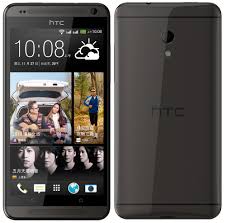
 HTC Desire 700 is an Android smartphone with dual SIM card capability. It has pretty attractive design with slightly curved corners. Its 5.0″ display has a resolution of 540 x 960 pixels (220 ppi pixel density). The quality of the visuals is not disappointing. It looks bright and delivers good color accuracy. The capacitive touchscreen is very responsive and equipped with multitouch support. It also features HTC Sense UI 5.0, accelerometer and proximity sensor.
The Desire 700 comes with Android v4.1.2 (Jelly Bean) operating system. It is armed with a quad-core 1.2 GHz Cortex-A7 processor, Mali-400 GPU and 1 GB of RAM. It provides enough power to do various tasks. You can launch apps quickly and switch menus smoothly. It also has no problem in multitasking. The Desire 700 works in decent speed, so you can save more of your time. 8 GB built-in memory is available to accommodate your files. If you think it’s not enough, you can use external memory card (up to 64 GB) to expand the storage capacity.
HTC Desire 700 is equipped with an 8 MP camera on the rear panel. It has some supporting features like autofocus, LED flash, 1/3.2” sensor size, geo-tagging, touch focus, simultaneous HD video and image recording (1080p@22fps), face detection, and HDR. A secondary 2.1 MP camera is embedded on the front panel.
Other features in HTC Desire 700:
- Connectivity options: Wi-Fi 802.11 a/b/g/n (dual-band), Wi-Fi Direct, Wi-Fi hotspot; DLNA; microUSB v2.0, USB On-the-go; and Bluetooth v4.0, A2DP.
- Compass, Email, Push Email, HTML5 browser
- FM radio
- GPS with A-GPS and GLONASS
- MP4/H.263/H.264/WMV player and MP3/eAAC+/WMA/WAV player
- Google Search, Maps, Gmail, YouTube, Calendar, Google Talk
- Document viewer/editor
- Photo viewer/editor
- Stereo speakers, Built-in amplifiers
- Voice memo/dial/commands
Dimensions: 145.5 x 72 x 10.3 mm (5.73 x 2.83 x 0.41 in)
Weight: 149 g (5.26 oz)
Performing a factory reset from settings
- Slide the Notifications panel open, and then tap settings icon.
- Tap Backup & reset.
- Tap Reset phone.
- If you also want to delete media and other data on HTC Desire 700, select Erase all data.
- Tap OK.
Performing a factory reset using hardware buttons
- Remove the battery, wait for a few seconds, then reinsert the battery.
- Press and hold the VOLUME DOWN button, and then press and hold the POWER button.
- Wait for the screen with the three Android images to appear, and then release the POWER and VOLUME DOWN buttons.
- Press VOLUME DOWN to select FACTORY RESET, and then press the POWER button.
Download HTC Desire 700 User Manual PDF