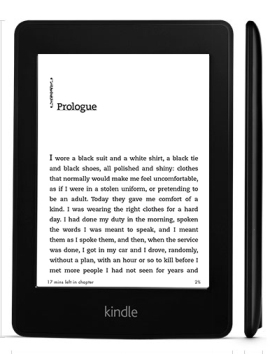
 Kindle Paperwhite is a very nice e-book reader. It boasts an amazing 6.0” Paperwhite display (212 ppi) that enables better visibility even when you read e-book outdoors, under direct sunlight. It is equipped with innovative built-in light that can adjust with all lighting conditions and reduce screen fatigue, so you can read more comfortably. You can hold it in one hand since it’s not too large and lightweight. The touchscreen is quite responsive and easy to use. It allows you to switch pages smoothly. You can also adjust text size to prevent tired eyes.
Kindle Paperwhite provides 2 GB of internal storage. It doesn’t seem much for a tablet or smartphone, but for an e-reader it means that you can save more than 1,000 books in this device. It only takes seconds to download your favorite books. The Paperwhite offers a lot of features that indulge your love of reading. Goodreads on Kindle will help you discover great books or share what you are reading with the online community of book lovers. The Kindle Unlimited allows you to choose and freely explore thousands of books with various genres. You can try Kindle Unlimited free for 30 days.
Organizing your books into custom categories is possible with the help of Cloud Collections. Instant translation is provided by Bing Translator. You just need to tap any word to translate it into other languages. Another good thing about Kindle Paperwhite is its battery life. A single charge may last up to eight weeks (depends on usage), so you don’t have to charge it too often. Kindle Paperwhite is available in two versions, Wi-Fi only and Wi-Fi + free 3G.
Other features in the new Kindle Paperwhite 2013:
- Kindle FreeTime
- Kindle in the classroom
- Auto wake and sleep
- Free book samples
- In-line footnotes
- Free books in the public domain
- Kindle app that allows you to read Kindle books on your smartphone, tablet, or computer.
- Supported formats: Kindle Format 8 (AZW3), Kindle (AZW), TXT, PDF, unprotected MOBI, PRC natively; HTML, DOC, DOCX, JPEG, GIF, PNG, BMP through conversion
Size: 6.7″ x 4.6″ x 0.36″ (169 mm x 117 mm x 9.1 mm)
Weight: 7.3 ounces (206 grams)
Setting up Kindle Paperwhite
Go to the Home screen now, select Set Up Your Kindle, and follow the onscreen prompts. Once you have completed the setup process, Set Up Your Kindle will no longer appear on your Home screen.
Download Kindle Paperwhite User Manual