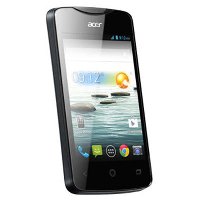
 Acer Liquid Z3 has relatively small size with 3.5″ touchscreen. The design is not too bad for a small phone, but the plastic material makes it look cheap. Considering this is a budget phone, you may feel unnecessary to complain much about it. The screen doesn’t look impressive since it’s only backed by 320 x 480 pixels resolution (165 ppi pixel density). You may find the touchscreen a little slow, but you can still navigate easily through menus. Other supporting features like Multitouch, Accelerometer, and Proximity sensor are included.
Acer Liquid Z3 comes with Android v4.2 (Jelly Bean) operating system inside. It performs pretty well with the support of a dual-core 1 GHz Cortex-A7 processor, Mali-400 GPU and 512 MB of RAM. It delivers decent speed, so you can do various tasks comfortably. There is no serious lag when you switch between menus. You’ll only have 4 GB built-in memory to store your files. If you like to take photos or download videos, you can add more space by using external memory card (by up to 32 GB).
The Liquid Z3 is equipped with a basic 3.15 MP rear camera, which features geo-tagging and video recording capability. It doesn’t include front-facing camera that supports video calling. Acer Liquid Z3 is also available in dual SIM card version
Other features in Acer Liquid Z3:
- Connectivity options: Wi-Fi 802.11 a/b/g/n, Wi-Fi hotspot; Bluetooth v3.0, A2DP, EDR; and microUSB v2.0..
- Email, Push Email
- Stereo FM radio & GPS with A-GPS
- Exchangable back covers
- MP3/WAV/WMA/AAC player & MP4/H.264/H.263 player
- Document viewer
- Photo viewer/editor
- Voice memo/dial
- Predictive text input
Dimensions: 109 x 60 x 10.4 mm (4.29 x 2.36 x 0.41 in)
Weight: 120 g (4.23 oz)
Restoring to factory settings
If your phone is responding to screen input, then open Settings from the Application menu. Tap Backup & reset > Factory data reset > Reset phone and then Erase everything to format your phone.
Download Acer Liquid Z3 User Manual