Samsung Z3 is not an Android smartphone as you may expect. Tizen v2.3 operating system is installed in this phone. It has two SIM card slots so you can use different providers simultaneously and adjust them according to your needs. The phone comes with lower mid-range specifications. It uses Spreadtrum chipset with a quad-core 1.3 GHz processor. It works along with 1 GB of RAM. It has the capacity to do simple tasks well. The processing speed will not blow your mind but it should be good enough to keep you on track while working. The Li-Ion 2600 mAh battery provides long battery life. You don’t have to charge the phone too often during the day. For the storage, Samsung Z3 offers 8 GB built-in memory along with memory card slot for storage expansion.
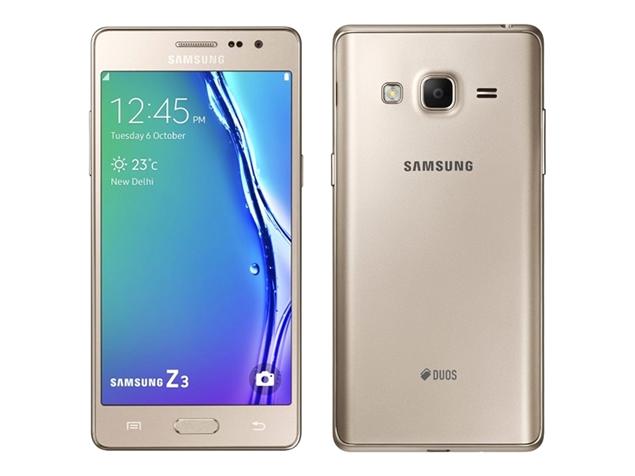 Samsung Z3 is a stylish phone. It has sleek design with metallic finish that makes it looks very attractive. The body is slim and seems solid. On the front panel you can see a beautiful 5.0″ Super AMOLED screen which has 69.5% screen-to-body ratio. You’ll be able to enjoy great visuals as the screen has a high resolution of 720 x 1280 pixels and 294 ppi pixel density. The multitouch touchscreen has good sensitivity. It allows smooth navigation. Despite the large size, Samsung Z3 seems pretty comfortable to operate with one hand. The spacious obscure keyboard is definitely an advantage for large fingers. They can type easily without being too worried of making too many typos.
The camera department is not disappointing at all. Samsung Z3 has an 8 MP camera on the rear panel. This main camera is equipped with LED flash, Geo-tagging, face detection and video recording capability. It seems quite reliable for everyday use. It’s capable of taking good quality pictures for your Instagram or other social media. With a front-facing 5 MP camera above the display, Samsung Z3 is officially a selfie phone. It has better capability to capture images and makes video calling a fun experience.
Other features in Samsung Z3:
– Connectivity options: Wi-Fi 802.11 b/g/n; Bluetooth v4.0, A2DP, LE; and microUSB v2.0
– GPS with A-GPS, GLONASS
– FM radio
– Accelerometer and Proximity sensor
– Email, Push Mail, Instant Messaging
– HTML browser
– MP4/H.264 player and MP3/WAV/AAC/Flac player
– Photo viewer
– Document viewer
Size: 141.6 x 70 x 7.9 mm (5.57 x 2.76 x 0.31 in)
Weight: 137 g (4.83 oz)
How to Hard Reset Samsung Z3
Make sure you’ve made a backup of your important files before performing hard reset process since all files will be erased. After the hard reset is completed, your phone will return to its factory settings.
- From the Home Screen go to Menu and open Settings.
- Select Backup & Reset.
- Tap Factory data reset.
- Choose Reset device and then tap Erase everything.