This is good news for physical keyboard fans. Blackberry Classic, also known as BlackBerry Q20, offers a superior physical QWERTY keyboard combined with a beautiful 3.5″ touchscreen display. It also adds an optical trackpad to make navigation easier. The screen has a resolution of 720 x 720 pixels and 294 ppi pixel density. It means that you’ll be able to enjoy great visuals although the screen is relatively small. The touchscreen is not only responsive, but also supports multitouch. To make it better, there is Corning Gorilla Glass 3 protecting the screen from serious damage.
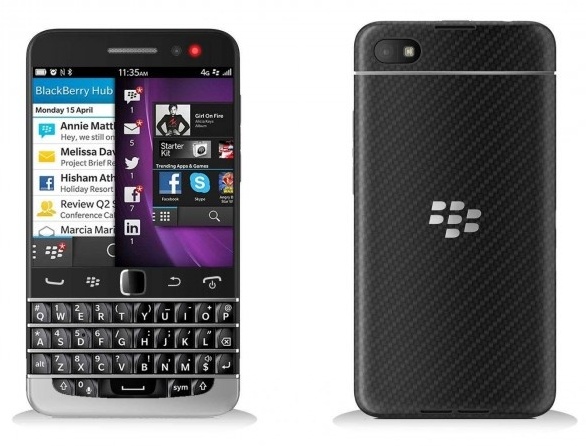 Blackberry Classic / BlackBerry Q20 is armed with a dual-core 1.5 GHz Krait processor, Adreno 225 GPU and 2 GB of RAM. Pretty good specifications to support various tasks. It is alraedy integrated with 4G LTE network so you can enjoy faster data connection. For the operating system, it uses BlackBerry 10.3.1. Storage department is very satisfying. You’ll get 16 GB built-in memory to store your files. Storage expansion is possible via memory card slot (accommodate up to 128 GB). The Blackberry Classic is equipped with 8 MP rear camera which features autofocus, LED flash, Geo-tagging, touch focus, face detection, HDR, panorama and video recording capability (1080p@30fps). For the secondary one, it has a front-facing 2 MP camera above the display.
Other features in Blackberry Classic / BlackBerry Q20:
– Accelerometer, Compass, Gyroscope and Proximity sensor
– Connectivity options: Wi-Fi 802.11 a/b/g/n (dual-band), hotspot; Bluetooth v4.0, A2DP, EDR, LE; NFC; and microUSB v2.0 (SlimPort).
– GPS with A-GPS
– FM radio
– Email, Push Email, Instant Messaging, BBM 6, HTML5 browser
– Active noise cancellation with dedicated mic
– MP3/WMA/WAV/eAAC+/FlAC player
– DivX/XviD/MP4/WMV/H.264 player
– Photo editor, video editor
– Document viewer
Size: 131 x 72.4 x 10.2 mm (5.16 x 2.85 x 0.40 in)
Weight: 177 g (6.24 oz)
How to Perform BlackBerry Classic Factory Reset
Before performing factory reset be sure to back up all of your important files.
- On the home screen, swipe down from the top of the screen.
- Select Settings > Security and Privacy > Security Wipe.
- Type: blackberry.
- Tap Delete Data.
When the process is completed, the phone will turn off automatically.
BlackBerry Classic / Blackberry Q20 User Guide Manual