LG L20 is a budget phone with compact design and a small 3.0″ capacitive touchscreen. Despite the small size, the L20 is quite reliable as a communication device. It is very practical to use and it doesn’t take much space in your pocket. The screen has a resolution of 240 x 320 pixels with 133 ppi pixel density. It’s not super sharp but it delivers decent visuals. You can read the text and view images clearly. The touchscreen is responsive and allows easy navigation. It already supports multitouch. The onscreen keyboard is pretty comfortable to use although it might be an issue for those who has big fingers.
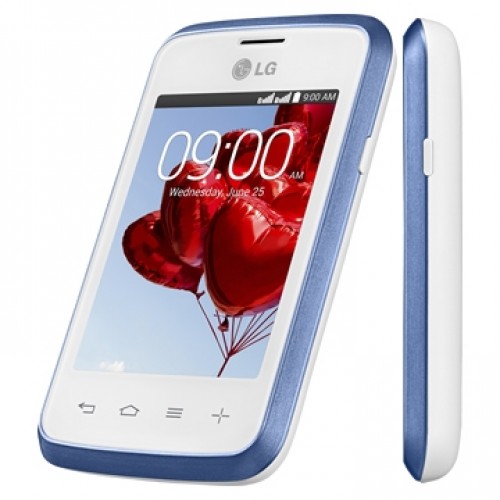 LG L20 is an Android v4.4.2 (KitKat) smartphone. It packs Mediatek MT6572M chipset with dual-core 1 GHz Cortex-A7 processor. It also includes Mali-400 GPU and 512 MB of RAM. The LG L20 offers the same apps and features that can be found in flagship smartphones. It means that the L20 also has the capability to do various tasks to support your daily activities. It’s just not as fast as smartphones with higher specs. You can still browse the internet easily although it has limited visual support. You will only have 4 GB built-in memory to store your files. Storage expansion is allowed via external memory card. The 2 MP rear camera might not impress you at all but that’s what you can get from a budget phone. It is equipped with geo-tagging and video recording capability. The LG L20 doesn’t have a secondary camera for video calling.
Other features in LG L20:
- Email, Instant Messaging, Internet browser
- FM radio
- GPS with A-GPS & GLONASS
- MP4/H.264/H.263 player and MP3/eAAC+/WAV player
- Photo viewer/editor
- Document viewer
- Voice memo and Voice dial
- Predictive text input.
Size: 105.6 x 64.5 x 13 mm (4.16 x 2.54 x 0.51 in)
Weight: 111g
How to hard reset LG L20
If your phone does not restore to its original condition, use a Hard Reset (Factory Reset) to initialise it.
- Turn the power off.
- Press and hold the Power/Lock Key + Volume Down Key on the phone.
- Release the Power/Lock Key only when the LG logo is displayed.
- Press the Power/Lock Key again within 3 seconds.
- Release all keys when the Factory data reset screen is displayed.
- As shown on the screen, press the Power/Lock Key twice, and the factory reset will be performed.
If you press the Volume UP or Down Key during the Factory reset screen appeared, the Factory reset is not performed and the normal boot is performed.