Acer Liquid Z4 is a mid-range smartphone with dual SIM card capability. It uses Android v4.2.2 (Jelly Bean) operating system. The Liquid Z4 can be a good option for those who need an efficient communication device that can support daily activity. The Liquid Z4 packs a dual-core 1.3 GHz processor and 512 MB of RAM. It doesn’t offer monstrous speed but seems pretty reliable to do basic tasks like emailing, browsing, making a phone call and editing documents. You can also take fairly good pictures with the main 5 MP camera. It is located on the rear panel and equipped with LED flash and video recording capability. The Acer Liquid Z4 doesn’t include a front-facing camera. If you like to take photos or download videos, the 4 GB built-memory doesn’t seem suitable for your needs. Expanding the storage capacity via external memory card can be the only solution to accommodate your files.
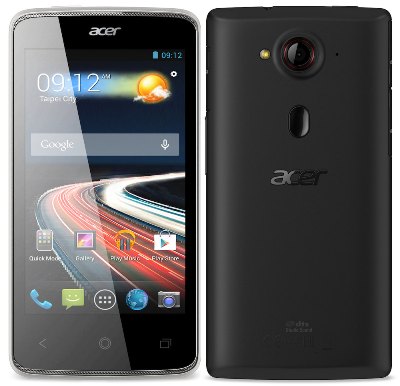 Acer Liquid Z4 has pretty good design. It looks slim and ergonomic. It can fit perfectly in your pocket. It also provides good grip so you can hold it more comfortably. The Liquid Z4 comes with 4.0″ capacitive touchscreen that can be operated easily with one hand. The touchscreen is responsive so it will ease your job. Of course you won’t miss multitouch support. It has good brightness and visibility. The visuals look decent with a resolution of 480 x 800 pixels (233 ppi pixel density). You can still enjoy streaming videos or browsing the internet.
Other features in Acer Liquid Z4:
- Accelerometer and Proximity sensor.
- DTS sound
- GPS
- Email, Push Email, HTML browser
- Active noise cancellation with dedicated mic
- MP3/WAV/AAC player and MP4/H.264 player
- Document viewer
- Photo viewer/editor
- Voice memo/dial
Size: 9.7 mm thickness
Weight: 130 g (4.59 oz)
Acer Liquid Z4 Factory Reset Procedures
Open Settings from the Application menu. Tap Backup & reset > Factory data reset > Reset phone and then Erase everything to format your phone
Download Acer Liquid Z4 User Manual PDF