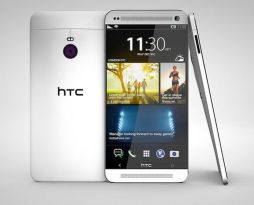
 HTC One M8 has a sleek design with a huge 5.0″ Super LCD3 display and thin bezel. The screen has a high resolution of 1080 x 1920 pixels (441 ppi pixel density) and protected by Corning Gorilla Glass 3. It looks sharp and vibrant. It also delivers good details and color accuracy. It’s perfect to watch HD videos or play high-graphic games. The touchscreen is quite responsive and supports multitouch. You can navigate smoothly through menus. Other features like HTC Sense UI 6.0, Accelerometer, Gyroscope and Proximity sensor are included.
Android v4.4.2 (KitKat) operating system is installed in this phone. It can be upgraded to v4.4.3 (KitKat). The HTC One M8 relies on a powerful quad-core 2.3 GHz Krait 400 processor, Adreno 330 GPU and 2 GB of RAM to support its performance. The result is pretty impressive. The phone works responsively and delivers great speed to execute various tasks. Multitasking shouldn’t be a problem at all. Faster data connection is possible with the 4G LTE support. With 16/32 GB built-in memory, you’ll have a lot iof space to store your files, even the large ones. The phone also allows storage expansion via external memory card (up to 128 GB).
Dual 4 MP camera can be found on the back of the phone. It features autofocus, dual-LED (dual tone) flash, 1/3” sensor size, 2µm pixel size, automatic simultaneous video and image recording, geo-tagging, face/smile detection, HDR, panorama and HD video recording capability (1080p@60fps, 720p@120fps). If you like to take selfies, you might like the front-facing 5 MP camera.
HTC One M8 also offers other features such as:
- Connectivity options: Wi-Fi 802.11 a/b/g/n/ac, dual-band, Wi-Fi Direct, Wi-Fi hotspot; DLNA; Bluetooth v4.0, A2DP; microUSB v2.0 (MHL), USB On-the-go, USB Host; NFC; and Infrared port.
- Compass and Barometer
- Email, Push Email, HTML5 browser
- Stereo FM radio with RDS
- GPS with A-GPS, GLONASS
- Fast battery charging: 60% in 30 min (Quick Charge 2.0)
- TV-out (via MHL A/V link)
- Google Drive (50 GB cloud storage)
- Active noise cancellation with dedicated mic
- Stereo speakers and built-in amplifiers
- DivX/XviD/MP4/H.263/H.264/WMV player & MP3/eAAC+/WMA/WAV/FLAC player
- Document editor
- Photo/video editor
Dimensions: 146.4 x 70.6 x 9.4 mm (5.76 x 2.78 x 0.37 in)
Weight: 160 g (5.64 oz)
Performing a factory reset from settings
- Go to Settings, and then tap Backup & reset.
- Tap Reset phone.
- If you want to delete media, documents, and other data from the phone storage, select Erase all data. To also delete media and other data from your storage card, select Erase SD card.
- Tap OK.
Performing a factory reset using hardware buttons
If you can’t turn HTC One on or access settings, you can still perform a factory reset by using the hardware buttons on HTC One.
- Press and hold the VOLUME DOWN button, and then press and hold the POWER button.
- Wait for the screen with the three Android images to appear, and then release the POWER and VOLUME DOWN buttons.
- Press VOLUME DOWN to select FACTORY RESET, and then press the POWER button.
Download HTC One M8 User Manual PDF
Very good information. Lucky me I came across your website
by accident (stumbleupon). I’ve book-marked it for later!