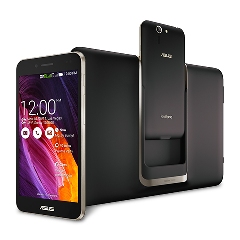
 Asus PadFone S comes with an innovative design that allows you to convert a smartphone into a tablet. As a smartphone, the Padfone S boasts 5.0″ Full HD display with a resolution of 1080 x 1920 pixels. It delivers amazing visuals, so you can have more joy in watching videos or playing games. When the phone is docked into the station, you can get an 8.9-inch tablet with Full HD display (1920 x 1200 pixels resolution). Both screen sizes are optimized for different needs. The Padfone S ensures you get the best visual experience in each mode. The responsive touchscreen supports Multitouch (up to 10 fingers) and protected by Corning Gorilla Glass. It also includes basic features like Accelerometer, Gyroscope, and Proximity sensor.
Asus Padfone S packs a powerful Quad-core 2.3 GHz Krait 400 processor, Adreno 330 GPU and 2 GB of RAM. With that specs, nothing is too difficult for this phone. Android v4.4.2 (KitKat) operating system runs flawlessly in this phone. It handles multitasking very well and most apps can load quickly. You can even browse the internet more comfortably with the support of 4G LTE network. The Padfone S allows you to work more efficiently and enjoy a great multimedia experience. To store your files, it provides 16 GB built-in memory. If you want to keep large files, you can add external memory card (by up to 64 GB).
Asus Padfone S is equipped with a brilliant 13 MP camera on the rear panel. It features autofocus, LED flash, Geo-tagging, touch focus, face detection and video recording capability (2160p@12-25fps, 1080p@30fps, 720p@60fps). A front-facing 2 MP camera is a good addition since you can use it to make video calls or take selfies.
Other features:
- Connectivity options: Wi-Fi 802.11 a/b/g/n/ac (dual-band), Wi-Fi Direct, Wi-Fi hotspot; Bluetooth v4.0, A2DP; microUSB v2.0 (SlimPort), USB Host; and NFC.
- Compass, Push Email, Instant Messaging, Internet browser
- GPS with A-GPS
- Active noise cancellation with dedicated mic
- TV-out (via MHL A/V link)
- ASUS WebStorage (50 GB storage)
- Wireless charging capability
- Asus SonicMaster technology for enhanced audio quality
- MP3/WAV/eAAC+ player and MP4/H.264/H.263 player
- Document viewer
- Photo viewer/editor
- Voice memo/dial
Dimensions: 143.4 x 72.5 x 10 mm (5.65 x 2.85 x 0.39 in)
Weight: 150 g (5.29 oz)
How to reset Asus PadFone S
- Tap Settings > Backup & reset.
- From the Backup & reset window you can choose Factory data reset to erase all data on phone
Download Asus PadFone S User Manual