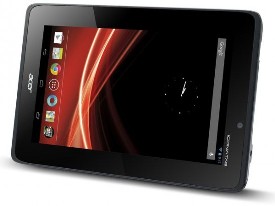
 Acer Iconia Tab A110 looks less attractive with its boxy design and glossy plastic construction. The good thing about the design is its rubberized back that allows you to hold the device more comfortably. The Iconia Tab A110 sports 7-inch touchscreen with a resolution of 600 x 1024 pixels (170 ppi pixel density). It doesn’t offer impressive visuals, but it supports basic tasks pretty well. The touchscreen is quite responsive, so you can navigate through the menus smoothly and finish your tasks easily. It has some supporting features like Multitouch (up to 10 fingers), Acer UI, Accelerometer and Gyroscope.
Acer Iconia Tab A110 runs on Android v4.1 (Jelly Bean) operating system. Unlike its outer look, the tablet’s performance is not disappointing at all. The quad-core 1.2 GHz processor provides enough power to handle various tasks. There is no serious delay when launching apps. It also shows smooth transition between menus. To accommodate your files, the Iconia Tab A110 provides 8 GB of internal storage. If you need more space, memory card slot is available for storage expansion. You won’t find anything special on the camera department. The tablet is only equipped with a 2 MP rear camera which features geo-tagging and video recording capability. Front-facing camera is not included.
Acer Iconia Tab A 110 also features:
- Connectivity options: Wi-Fi 802.11 b/g/n; Bluetooth v3.0 with A2DP; and microUSB v2.0.
- Compass
- Email, Push Email, Instant Messaging, RSS, HTML5
- GPS with A-GPS (3G model) support and GLONASS
- HDMI port
- Google Search, Maps, Gmail, YouTube, Google Talk, Picasa,
- MP3/WAV/WMA/eAAC+ player & XviD/MP4/H.264/H.263 player
- Document viewer
- Photo viewer/editor, Predictive text input and more.
Dimensions: 193 x 126.5 x 11.4 mm (7.60 x 4.98 x 0.45 in)
Weight: 390 g (13.76 oz)
Resetting the Tablet
Open Settings from the application menu, then tap Backup & reset > Factory data reset; click Reset tablet and then Erase everything to format your tablet
Download Acer Iconia Tab A110 User Manual