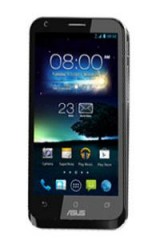
 Asus PadFone 2 has an attractive design with slightly curved edges. It sports a 4.7” Super IPS+ LCD capacitive touchscreen with 720 x 1280 pixels resolution. The screen looks pretty bright and clear. It has good sharpness and rich colors, so you can watch videos or photos with more joy. The touchscreen is responsive and easy to use, thanks to the multitouch support. It also includes Corning Gorilla Glass protection to prevent serious damage, Accelerometer, Gyroscope and Proximity sensor.
The Padfone 2 runs on Android v4.0 Ice Cream Sandwich operating system (upgradable to higher version). A powerful quad-core 1.5 GHz Krait processor is responsible for the phone’s performance. It’s backed by Adreno 320 GPU and 2 GB RAM. To accommodate your files, this device offers 16/32/64 GB of internal storage (optional). But that’s all you can get since it doesn’t include memory card slot for storage expansion. For the connectivity, it has some options like Wi-Fi 802.11 a/b/g/n (dual-band), Wi-Fi hotspot; Bluetooth v4.0 with A2DP; and microUSB (MHL) v2.0. The main 13 MP camera is another plus point of the phone. The camera is equipped with many features including autofocus, LED flash, Geo-tagging, touch focus, face detection, and video recording capability (1080p@30fps). If you need to make a video call, the phone provides a front-facing 1.2 MP camera.
Other features:
- Optional Padfone Station with 10.1 inches IPS display (1280 x 800 pixels)
- GPS with A-GPS support
- Radio
- Push Email; Instant Messaging, SNS integration
- Active noise cancellation with dedicated mic
- TV-out (via MHL A/V link)
- ASUS WebStorage (50 GB storage)
- MP3/WAV/eAAC+ player & MP4/H.264/H.263 player
- Document viewer
- Photo viewer/editor
- Voice memo/dial
Dimensions: 137.9 x 68.9 x 9 mm (5.43 x 2.71 x 0.35 in)
Weight: 135 g (4.76 oz)
Set up the phone
The first time you turn on your Padfone 2, you’ll see the welcome screen. Touch the menu to choose your preferred language and touch Next Step. Follow the succeeding instructions to set up the phone.